

AI tools for video thumbnail creation have genuinely changed how Indian YouTubers and Reels creators design click-worthy visuals — no graphic design degree needed. Whether you post in Hindi, Tamil, or Telugu, the right tool makes 1280×720 exports effortless.
Table of Contents
- Quick Comparison: AI Tools for Video Thumbnail Creation
- 1. Canva — Best AI Tool for Video Thumbnail Creation for Indian Creators
- 2. Adobe — Best AI Tool for Video Thumbnail Creation for Pro Designers
- 3. CapCut — Best AI Tool for Video Thumbnail Creation for Reels Creators
- 4. Picsart — Best AI Tool for Video Thumbnail Creation with Photo Editing
- 5. Krea AI — Best AI Tool for Video Thumbnail Creation for Image Upscaling
- 6. InVideo — Best AI Tool for Video Thumbnail Creation in a Video Workflow
- 7. VEED — Best AI Tool for Video Thumbnail Creation from Video Frames
- How to Pick the Right AI Tool for Video Thumbnail Creation
- My Personal Pick from These AI Tools for Video Thumbnail Creation
- FAQs About AI Tools for Video Thumbnail Creation
Quick Comparison: AI Tools for Video Thumbnail Creation
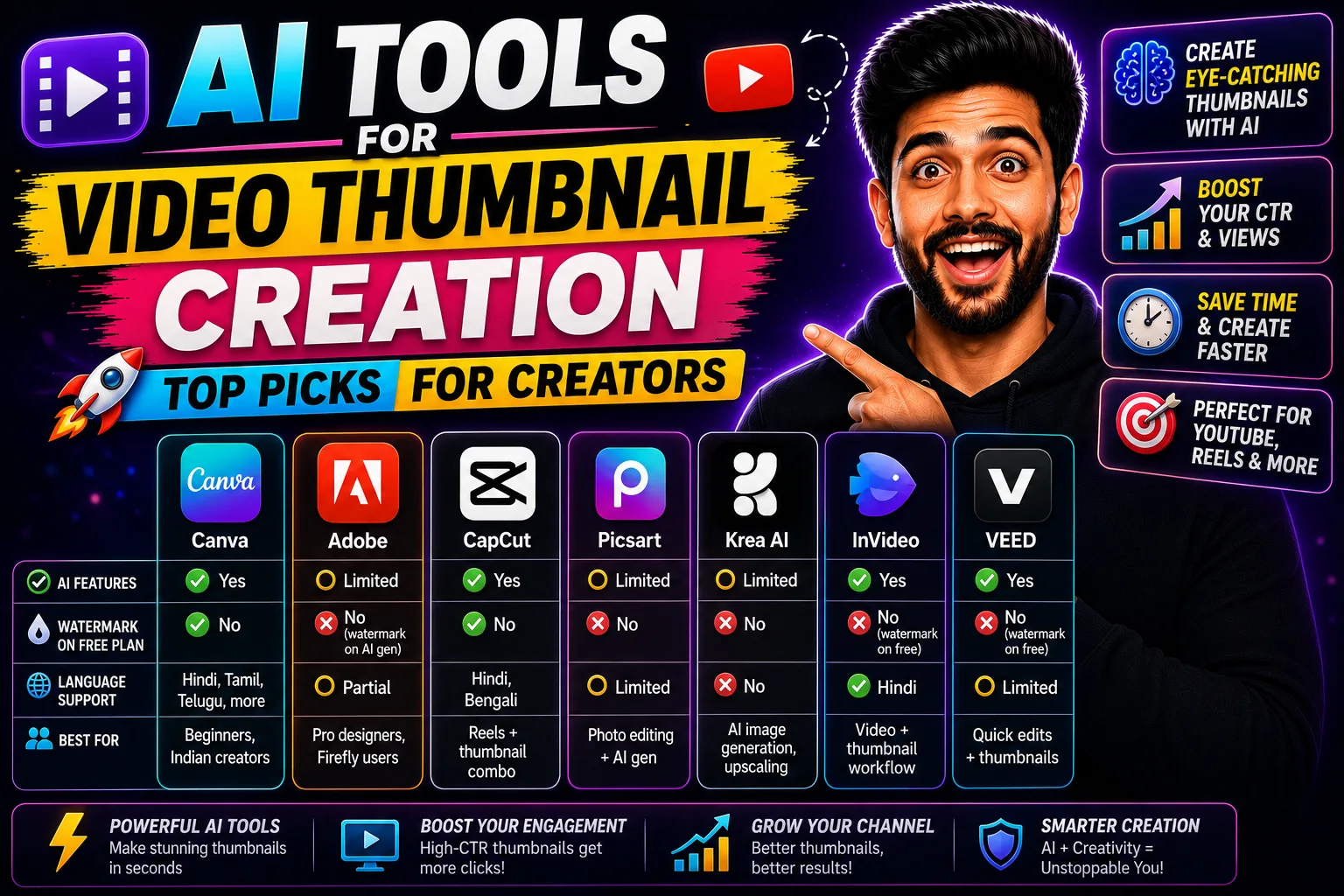
| Tool | Free Plan | Paid Plan | Watermark-Free Free? | Indian Language Support | Best For |
|---|---|---|---|---|---|
| Canva | Yes | [aitool id=”canva”] | Yes | Hindi, Tamil, Telugu, more | Beginners, Indian creators |
| Adobe | Limited | [aitool id=”adobe”] | No (watermark on AI gen) | Partial | Pro designers, Firefly users |
| CapCut | Yes | [aitool id=”capcut”] | Yes | Hindi, Bengali | Reels + thumbnail combo |
| Picsart | Limited | [aitool id=”picsart”] | No | Limited | Photo editing + AI gen |
| Krea AI | Limited | [aitool id=”krea-ai”] | No | No | AI image generation, upscaling |
| InVideo | Yes | [aitool id=”invideo”] | No (watermark on free) | Hindi | Video + thumbnail workflow |
| VEED | Yes | [aitool id=”veed”] | No (watermark on free) | Limited | Quick thumbnail from video frame |
Buy AI Tools at Cheapest Price
1. Canva — Best AI Tool for Video Thumbnail Creation for Indian Creators
Canva is my number-one pick for AI tools for video thumbnail creation, and honestly it’s not even close for the Indian market. The free plan gives you watermark-free PNG exports at full resolution — that alone beats most competitors. The AI background remover works in one click, and the “Magic Design” feature generates entire thumbnail layouts from a single photo upload.
What makes it especially useful here is the font library for Hindi, Tamil, Telugu, Kannada, and Bengali. Festival thumbnails — think Diwali sale videos or IPL reaction content — look polished because the Devanagari and regional script rendering is actually good. Most other tools just slap a generic font and call it done.
The free plan covers around 5 GB storage and unlimited template use. Paid plan unlocks Brand Kit, bulk resizing, and priority AI generation. If you’re doing Upwork or Fiverr work for clients, the free tier is enough to start. Canva’s official site has a YouTube thumbnail template section worth bookmarking.
2. Adobe — Best AI Tool for Video Thumbnail Creation for Pro Designers
Adobe’s suite — specifically Adobe Express plus Firefly integration — is where professional thumbnail work happens. Adobe Express has solid AI text effects and Firefly-powered generative fill that lets you swap backgrounds or extend images realistically. The quality is noticeably sharper than most browser-based AI tools for video thumbnail creation.
But here’s the thing — the free plan puts a watermark on anything you generate with Firefly. And the paid plan is significantly more expensive than Canva. For freelancers billing clients in INR, that math matters. If your client is paying ₹500 per thumbnail, Adobe’s pricing doesn’t make sense until you scale.
Where Adobe wins is when you need pixel-level control — custom layer effects, precise typography with OpenType features, and direct export into Premiere Pro for consistent branding. Agencies doing high-volume YouTube work for brands will find the Adobe ecosystem worth it.
3. CapCut — Best AI Tool for Video Thumbnail Creation for Reels Creators
CapCut is underrated as one of the AI tools for video thumbnail creation, mostly because people think of it as only a video editor. But the thumbnail maker inside CapCut is genuinely powerful — you can pull a frame directly from your edited video, apply AI background removal, add animated text presets, and export at 1280×720 without watermarks on the free plan.
The AI smart cutout feature works especially well for face-heavy thumbnails, which is exactly what most Indian YouTube channels use. Reaction channels, vlog creators, educational content — all rely on expressive face + bold text layouts, and CapCut handles this faster than switching to a separate tool.
One limitation: the template library is smaller than Canva’s, and Hindi font options are narrower. But if your entire workflow is mobile-first — shooting, editing, and publishing from your phone — CapCut keeps everything inside one app.
4. Picsart — Best AI Tool for Video Thumbnail Creation with Photo Editing
Picsart sits somewhere between a photo editor and a thumbnail design tool. The AI background remover and the AI image generator both work decently for creating thumbnail backgrounds — useful when you don’t have a clean studio shot and need to fake one fast.
The free plan is limited though. You get watermarked exports and a daily cap on AI generations. For a creator doing consistent uploads, that friction adds up. The paid plan is more affordable than Adobe but still not as feature-complete as Canva for the same price point. Best used for one-off thumbnail projects or when you need realistic photo retouching that other AI tools for video thumbnail creation don’t offer.
5. Krea AI — Best AI Tool for Video Thumbnail Creation for Image Upscaling
Krea AI is the niche pick here. It’s not a template-based thumbnail tool — it’s an AI image generation and real-time canvas tool that’s excellent for creating custom thumbnail visuals from scratch. The upscaler is particularly good: if you have a low-res photo from a shoot, Krea can upscale it to print quality, which then becomes your thumbnail background.
No Indian language support. No preset templates. The free tier is quite restricted. But for creators who want completely original AI-generated thumbnail artwork — no stock photos, no templates — Krea delivers results that look genuinely different. Worth exploring if you’re tired of the same Canva template aesthetics everyone uses.
6. InVideo — Best AI Tool for Video Thumbnail Creation in a Video Workflow
InVideo is primarily a video creation tool, but it has a thumbnail generator that pulls from your video content. If you’re already using InVideo to create the video itself — common for AI-generated video content — the thumbnail step happens inside the same dashboard. That’s genuinely convenient.
The free plan adds a watermark, which is a dealbreaker for professional work. And the thumbnail customization options are fewer than dedicated design tools. But for beginners just starting their YouTube channel who want a fast end-to-end workflow in one tool, InVideo makes sense.
7. VEED — Best AI Tool for Video Thumbnail Creation from Video Frames
VEED lets you grab any frame from your uploaded video and convert it into a thumbnail with text overlays, filters, and basic AI enhancements. For creators who already use VEED for subtitles and video editing, this removes one more tool from the workflow. The free plan watermarks thumbnails, so it’s mainly useful for evaluating before upgrading.
How to Pick the Right AI Tool for Video Thumbnail Creation
- Step 1: Check watermark policy first
Free plans on most AI tools for video thumbnail creation add watermarks. Canva and CapCut are the main exceptions — they give watermark-free exports even on free tiers. Decide your budget before anything else. - Step 2: Match the tool to your language needs
If you create content in Hindi, Tamil, or other Indian languages, test the font rendering before committing. Canva wins here. Most other tools have limited or no regional script support. - Step 3: Decide between templates vs. generative AI
Template-based tools (Canva, CapCut) are faster. Generative AI tools (Krea AI, Adobe Firefly) give more original results but take longer. Pick based on your upload frequency. - Step 4: Check export resolution
YouTube needs 1280×720 minimum. Most paid plans export at full HD. Free plans sometimes cap at 720p or lower — check this specifically for whichever AI tools for video thumbnail creation you shortlist. - Step 5: Test the free plan for one week
All these tools have free tiers. Use them for actual thumbnails before paying. Your workflow will tell you what’s missing faster than any review will.
See, for more on how AI is reshaping creator workflows, check out our guide to AI tools for content creators and this breakdown of free AI design tools worth bookmarking.
My Personal Pick from These AI Tools for Video Thumbnail Creation
Honestly, Canva is where I’d tell most Indian creators to start — and probably stay. The free plan is genuinely useful, not crippled. The Indian language support is real, not an afterthought. And the AI features — background removal, Magic Design, text effects — are good enough for 90% of YouTube thumbnail needs without touching the paid plan.
If you’re a freelancer on Fiverr or Upwork doing thumbnail work for clients, Canva Pro makes sense once you’re billing consistently. For advanced AI image generation, layer Krea AI on top for custom visuals and import them into Canva for final design. That combo covers almost everything.
Try the free plan on Canva first. Bookmark this page to compare as your needs grow.
FAQs About AI Tools for Video Thumbnail Creation
Q: Which AI tools for video thumbnail creation work best for Hindi YouTube channels?
A: Canva is the strongest choice for Hindi YouTube channels among AI tools for video thumbnail creation. It supports Devanagari script natively with a good font selection, offers watermark-free free exports, and has hundreds of thumbnail templates sized at 1280×720. CapCut is a decent second option for mobile-first creators, also supporting Hindi text rendering reasonably well.
Q: Are there free AI tools for video thumbnail creation without watermarks?
A: Yes. Canva’s free plan exports thumbnails at full resolution without any watermark — this is one of its biggest advantages. CapCut also offers watermark-free thumbnail exports on the free plan. Most other tools (VEED, InVideo, Picsart) add watermarks on free tier exports, requiring a paid upgrade for clean files.
Q: What export resolution should I use with AI tools for video thumbnail creation?
A: YouTube recommends 1280×720 pixels (16:9 ratio) with a maximum file size of 2 MB. Most AI tools for video thumbnail creation default to this size in their YouTube thumbnail templates. Export as JPG for smaller file size or PNG if you need transparency. Always double-check the export settings — some free plans default to lower resolutions.
Q: Can I use AI tools for video thumbnail creation for Instagram Reels covers?
A: Absolutely. Most AI tools for video thumbnail creation support multiple aspect ratios. For Instagram Reels covers, use 1080× (9:16 vertical). Canva, CapCut, and VEED all have specific Reels cover templates. CapCut is particularly smooth here since you can grab a frame directly from your Reel and design the cover inside the same app.
Q: How much do AI tools for video thumbnail creation cost in India?
A: Pricing varies. Canva Pro is around ₹4,000/year when billed annually — the most affordable premium option among major AI tools for video thumbnail creation. Adobe Express paid plans are significantly more expensive. CapCut’s paid plan is mid-range. Most tools offer monthly billing too, which costs more per month but has no annual commitment. For freelancers billing clients, even the paid plans typically pay for themselves within 2-3 thumbnail projects per month on Fiverr or Upwork.