

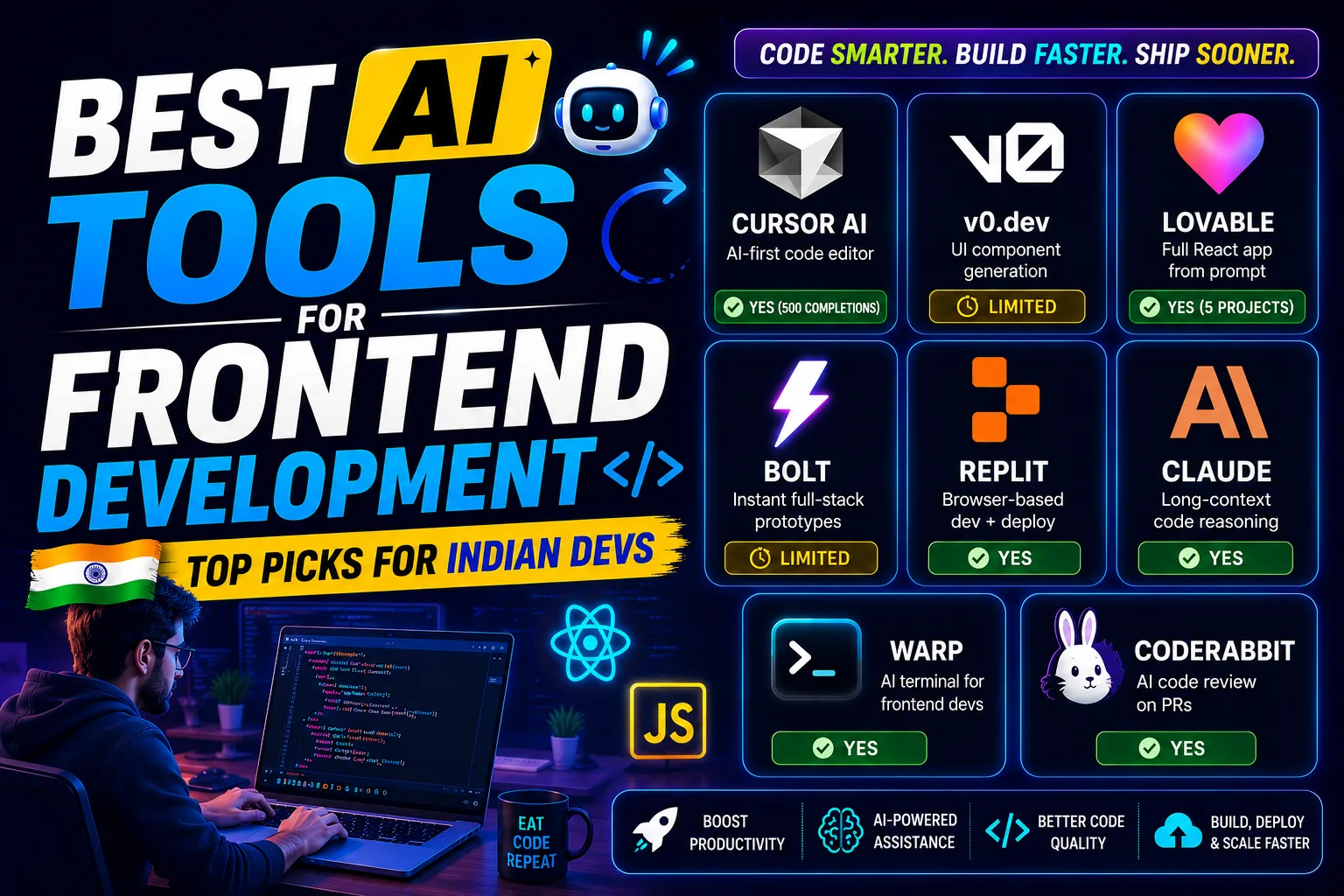
Finding the best AI tools for frontend development is not just a nice-to-have anymore — it is genuinely the difference between shipping in 2 days vs 2 weeks. I have tested most of these on real Upwork and Fiverr projects, and I am sharing exactly what works.
Table of Contents
- Quick Comparison: Best AI Tools for Frontend Development
- 1. Cursor AI — Best AI Tool for Frontend Development Daily Coding
- 2. v0.dev — Best AI Tool for Frontend Development UI Generation
- 3. Lovable — Best AI Tool for Frontend Development App Building
- 4. Bolt — Best AI Tool for Frontend Development Quick Prototyping
- 5. Replit — Best AI Tool for Frontend Development in the Browser
- 6. Claude — Best AI Tool for Frontend Development Code Reasoning
- 7. Warp — Best AI Tool for Frontend Development Terminal Work
- 8. CodeRabbit — Best AI Tool for Frontend Development Code Reviews
- How to Pick the Right Best AI Tool for Frontend Development
- My Personal Pick from These Best AI Tools for Frontend Development
Quick Comparison: Best AI Tools for Frontend Development
| Tool | Best For | Free Plan | Paid |
|---|---|---|---|
| Cursor AI | AI-first code editor | Yes (500 completions) |
[aitool id=”cursor-ai”]
|
| v0.dev | UI component generation | Limited |
[aitool id=”v0-dev”]
|
| Lovable | Full React app from prompt | Yes (5 projects) |
[aitool id=”lovable”]
|
| Bolt | Instant full-stack prototypes | Limited |
[aitool id=”bolt”]
|
| Replit | Browser-based dev + deploy | Yes |
[aitool id=”replit”]
|
| Claude | Long-context code reasoning | Yes |
[aitool id=”claude”]
|
| Warp | AI terminal for frontend devs | Yes |
[aitool id=”warp”]
|
| CodeRabbit | AI code review on PRs | Yes |
[aitool id=”coderabbit”]
|
Buy AI Tools at Cheapest Price
1. Cursor AI — Best AI Tool for Frontend Development Daily Coding
Cursor AI is a VS Code fork with AI baked in at every layer — autocomplete, chat, multi-file edits, and terminal commands all in one editor.
Honestly, this is the one tool that changed my actual day-to-day workflow the most. You write a comment like “create a responsive navbar with Tailwind” and it fills the entire component. The Composer feature lets you describe changes across multiple files at once — super useful when you are refactoring a React project and need to update props in five places simultaneously. The free plan gives you 500 AI completions per month, which is enough to evaluate it properly. Paid unlocks unlimited fast requests via Claude and GPT-4. For Indian freelancers billing in USD on Upwork, this thing pays for itself in the first project. Cursor’s official site has a clean comparison of what free vs paid includes. [aitool id=”cursor-ai”]
The learning curve is almost zero if you already use VS Code. Extensions, themes, keybindings — all carry over. The only real downside is that the free tier quota runs out fast if you are using it heavily. But as a starting point for testing the best AI tools for frontend development, nothing matches the immediate productivity bump.
2. v0.dev — Best AI Tool for Frontend Development UI Generation
v0.dev by Vercel generates production-ready React and shadcn/ui components directly from natural language prompts.
You type “a dark-mode pricing table with three tiers and a highlight on the Pro plan” and v0.dev gives you clean, copy-paste-ready JSX with Tailwind classes. No boilerplate. No guessing. This is genuinely one of the best AI tools for frontend development if your work involves building landing pages or SaaS dashboards for clients. v0.dev runs in the browser — no install needed. The free tier is limited credits per month, so I use it for the tricky UI pieces and handle the rest in Cursor. [aitool id=”v0-dev”]
Where v0.dev falls short: it generates UI, not logic. Routing, API calls, auth — you handle those yourself. Think of it as a very smart Figma-to-code tool, not a full app builder. But for what it does, it is unmatched.
3. Lovable — Best AI Tool for Frontend Development App Building
Lovable (formerly GPT Engineer) lets you build complete React applications by describing what you want in plain English.
This is where it gets interesting for freelancers. A client wants a Diwali sale landing page with a countdown timer, email capture, and Razorpay integration? Lovable can scaffold that in minutes. It connects to Supabase for backend, which means you get auth and a database without writing a single SQL query yourself. The free plan gives you 5 projects, which is genuinely useful for pitching clients or building MVPs. [aitool id=”lovable”]
See, here’s the thing — Lovable is not just a toy. Indie hackers have launched real products with it. The code it generates is readable and editable. If you already know React, you can take what Lovable generates and refine it in Cursor. That combination is arguably the fastest workflow among the best AI tools for frontend development right now.
4. Bolt — Best AI Tool for Frontend Development Quick Prototyping
Bolt is a browser-based tool from StackBlitz that builds and runs full-stack apps — frontend and backend — directly in your browser tab. No local setup, no npm install headaches. You describe an app, Bolt builds it, you see it live instantly. For quick client demos or festival-season microsites, this is hard to beat. [aitool id=”bolt”]
The free tier is limited in token usage, so you hit a wall fast on complex projects. But for the best AI tools for frontend development conversation, Bolt deserves a spot because the zero-setup experience is genuinely unique. Junior developers just starting out will find it especially useful.
5. Replit — Best AI Tool for Frontend Development in the Browser
Replit gives you a full cloud IDE with AI autocomplete, a built-in deployment pipeline, and multiplayer collaboration. It is particularly strong for beginners or anyone who does not want to maintain a local dev environment. The Replit AI can generate entire apps, debug errors, and explain code inline. Free plan is solid — you get real compute, not just a sandbox. [aitool id=”replit”]
For Indian students or early-career devs working on limited hardware, Replit is one of the most practical best AI tools for frontend development. Everything runs on their servers. Your laptop just needs a browser.
6. Claude — Best AI Tool for Frontend Development Code Reasoning
Claude by Anthropic handles 200k token context windows — meaning you can paste an entire codebase and ask it to refactor, explain, or debug. For frontend devs working on large React codebases, this is massive. I use Claude when I have a gnarly CSS layout bug that Cursor cannot figure out, or when I need to understand a complex state management pattern. Free plan via claude.ai is actually quite good for coding use cases. [aitool id=”claude”]
7. Warp — Best AI Tool for Frontend Development Terminal Work
Warp is a terminal app with AI built in. You type what you want to do — “find all unused CSS classes in this project” — and Warp suggests the exact command. For frontend devs who dread the terminal, this removes a real friction point. Free plan available, and it works on Mac and Linux. [aitool id=”warp”]
8. CodeRabbit — Best AI Tool for Frontend Development Code Reviews
CodeRabbit integrates with GitHub and reviews your pull requests automatically. It catches accessibility issues, performance anti-patterns, and unused dependencies — all things that matter in frontend work. If you are collaborating on a team or delivering code to clients on GitHub, CodeRabbit adds a quality layer without extra effort. Free for open source projects. [aitool id=”coderabbit”]
How to Pick the Right Best AI Tool for Frontend Development
- Step 1: Know your bottleneck
If you spend most time writing components, start with Cursor AI or v0.dev. If you need to ship full apps fast, go with Lovable or Bolt first. - Step 2: Test free tiers before paying
All eight tools here have free access. Spend one week on Cursor free, one week on v0.dev free. Your actual workflow will tell you which one earns a paid slot. - Step 3: Check your tech stack compatibility
v0.dev outputs React + Tailwind. Lovable uses React + Supabase. If you work in Vue or Svelte, Cursor AI is more stack-agnostic. Check before committing. - Step 4: Calculate ROI in freelance terms
If a tool saves you 5 hours per project and you charge ₹5,000/hr on Upwork, one project covers months of the paid plan. Do this math for your own rates. More on AI tools that pay off for freelancers. - Step 5: Layer tools, not replace
The best AI tools for frontend development are not either/or. I use Cursor daily, v0.dev for specific UI pieces, and Claude for debugging sessions. Stack them smartly.
My Personal Pick from These Best AI Tools for Frontend Development
If I could only keep two from this entire list, it would be Cursor AI and v0.dev. Cursor handles 80% of my daily coding work — it genuinely feels like having a second developer sitting next to me. And v0.dev solves the one thing that used to eat hours: building UI from scratch. Together, they cover the full frontend development workflow without overlap.
For someone just starting to explore the best AI tools for frontend development, I would say: try Cursor free for two weeks. If it clicks — and it will — you will never want to go back to a regular editor. See how Cursor compares to GitHub Copilot for Indian freelancers.
And if you are building client projects that need a full app scaffold fast, add Lovable to the mix. The Lovable + Cursor combo is probably the fastest frontend development workflow available right now without hiring extra help. Check out our full list of best AI tools for web development for a broader view.
Q: What are the best AI tools for frontend development for beginners?
A: For beginners, Replit and Lovable are the easiest entry points among the best AI tools for frontend development. Replit needs zero local setup and runs entirely in the browser. Lovable lets you describe an app in plain English and generates working React code. Both have free plans that are genuinely usable, not just demo-level access.
Q: Is Cursor AI better than GitHub Copilot for frontend development?
A: Cursor AI has an edge for most frontend developers because it supports multi-file editing, inline chat, and a full Composer mode — not just autocomplete. GitHub Copilot is great for autocomplete inside VS Code but lacks Cursor’s ability to reason across your whole project. Cursor’s free plan is also generous enough to properly test it. Copilot costs $10/month; Cursor’s free tier is quite capable for daily use.
Q: Which best AI tools for frontend development work without paid plans?
A: Cursor AI (500 completions/month free), Replit (free tier with real compute), Claude (free via claude.ai), Warp (free terminal), and CodeRabbit (free for open-source repos) all work meaningfully on free plans. v0.dev and Lovable have limited free tiers but are still useful for scoped projects. You can build real client work without spending a rupee to start.
Q: Can these best AI tools for frontend development handle Indian-specific projects like UPI or Razorpay integrations?
A: Yes. Cursor AI and Claude can generate Razorpay integration code if you describe your requirements clearly. Lovable can scaffold a full app with payment flow logic. The AI tools themselves are not India-specific, but they understand Razorpay, UPI flows, and Indian GST invoice logic well enough to generate working starter code. You will still need to verify API keys and test webhook logic yourself.
Q: How much should Indian freelancers budget for the best AI tools for frontend development?
A: Most Indian freelancers on Upwork or Fiverr can start with just the free tiers — Cursor free + Replit free + Claude free covers a strong workflow at zero cost. If you graduate to paid plans, Cursor Pro costs $20/month (~₹1,700) and Lovable Pro costs $25/month (~₹2,125). For freelancers billing even $50/month more due to speed gains, both plans pay back easily. Start free, upgrade when the math makes sense.
Try the free plan on Cursor AI this week — spend one real project with it before judging. Most developers who do never look back. Bookmark this page to revisit the comparison table when you are ready to upgrade.